
Explore the UK’s best virtual museum tours and discover world-class collections, historic landmarks, and cultural treasures from home, with free online experiences that make travel possible.
Fact-Checked By: Maya Whitfield—Senior Travel Editor at WakaAbuja
The best virtual museum tours in the UK are free and run through Google Arts & Culture, Google Street View, and individual museum websites. The British Museum, Natural History Museum, V&A, National Gallery, Tate Modern, and Science Museum all offer online access, with the British Museum and V&A giving the deepest object-level zoom. Most tours work on desktop, tablet, and phone, though Street View navigation is easiest on a larger screen.
I spent a full Saturday afternoon testing every major UK museum’s virtual tour from my laptop, and the honest truth is that they are not created equal. Some let you stand inside a gallery and look around. Others just let you zoom into a photo of a single object. A few are genuinely excellent.
This guide gives you the six best, what each one does well, and the exact link to start each tour so you do not have to hunt for it.
Jump to: Comparison Table | British Museum | Natural History Museum | V&A | National Gallery | Tate Modern | Science Museum | Device & Accessibility | FAQ
Key takeaways
- All six tours on this list are free. You do not need a ticket, account, or booking.
- The British Museum and V&A offer the deepest object-level zoom. Best for slow, detailed exploration.
- Street View tours are best on desktop. The navigation is clunky on a phone screen.
- The Natural History Museum has the best tour for kids. Short, visual, and easy to follow.
- The Tate Modern and National Gallery run occasional live curator talks. Check their websites for dates.
- You can complete a full virtual visit in 30 to 60 minutes per museum, or stretch it longer if you zoom into individual objects (confirm the latest details on the official museum site).
UK Virtual Museum Tours at a Glance

This table is the fastest way to decide which museum to start with. I have included the tour format, who it is best for, and whether it works well on a phone.
British Museum
Format: Street View + object zoom
Best for: Deep exploration of world history
Mobile-friendly: Partially better on desktop
Time needed: 45 to 90 minutes
Natural History Museum
Format: Video tour + object zoom
Best for: Kids and families
Mobile-friendly: Yes
Time needed: 30 to 45 minutes
V&A Museum
Format: Street View + collection zoom
Best for: Design, fashion, and decorative arts
Mobile-friendly: Partially
Time needed: 45 to 60 minutes
National Gallery
Format: High-resolution paintings + occasional live talks
Best for: Art lovers and students
Mobile-friendly: Yes
Time needed: 30 to 60 minutes
Tate Modern
Format: Virtual gallery rooms + artist talks
Best for: Modern and contemporary art fans
Mobile-friendly: Yes
Time needed: 30 to 45 minutes
Science Museum
Format: 3D object tours + video walkthroughs
Best for: Technology and engineering fans
Mobile-friendly: Yes
Time needed: 30 to 45 minutes
British Museum Virtual Tour: The Deepest Free Tour
The British Museum was founded in 1753 and was the first public national museum in the world. It holds over eight million objects, and the virtual tour gives you access to the highlights without the flight. You have two ways to view it: Google Street View for the galleries and Google Arts & Culture for the object-level zoom.
The Rosetta Stone, dating to 196 BC, is the most-visited single object in the museum, and the virtual tour lets you zoom in closer than you could in person without setting off an alarm. The Parthenon sculptures, created under Phidias around 447 to 432 BC, are also available at high resolution.
Start with the Street View tour. Use the on-screen controls to walk through the Great Court, then jump into the Egyptian sculpture gallery. When you find an object you like, switch to the Arts & Culture page for that specific item and zoom in. It is the closest you can get to standing in the room.
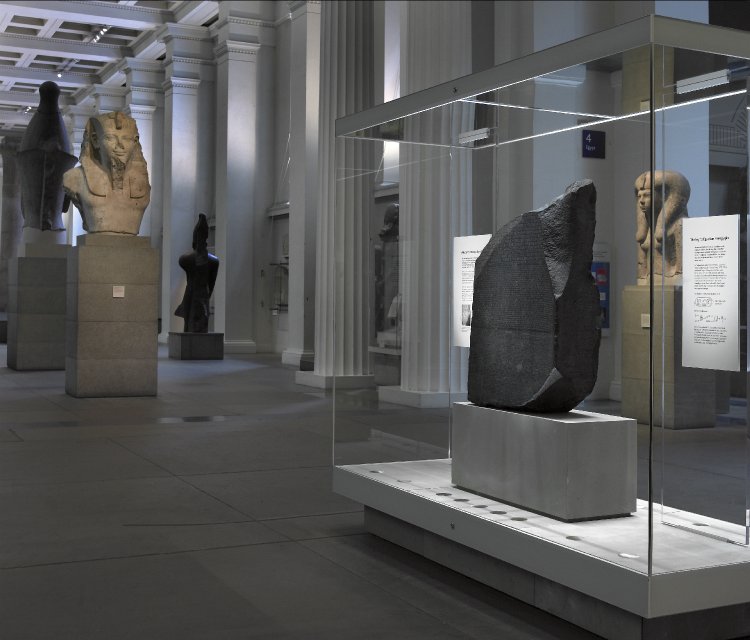
Maya Whitfield’s honest take: “The Street View tour of the British Museum is the closest thing to being there without a plane ticket. It is not perfect. The navigation takes a few minutes to learn. But the zoom on the Rosetta Stone is remarkable, and it is completely free.”
Natural History Museum Virtual Tour: Best for Families
The Natural History Museum in London has the most kid-friendly virtual tour on this list. It combines short video walkthroughs with zoomable specimens, so younger viewers can follow along without needing to learn complicated navigation controls. The dinosaur gallery tour is the standout, and the Hope the Whale exhibit is included in the online material.
This is the tour I would start with if you have children under 10. It is not the deepest tour, but it is the most accessible for short attention spans. Expect to spend 30 to 45 minutes total, or longer if you let the kids pick specific exhibits to revisit.
V&A Virtual Tour: Best for Design and Fashion
The Victoria and Albert Museum is the world’s leading museum of art, design, and performance, and its virtual tour reflects that focus. The Street View tour covers the main galleries, and the collection zoom feature lets you study individual pieces of fashion, ceramics, and metalwork in genuine detail.
If you are interested in the history of design, this is the tour to prioritize. The Fashion Gallery alone is worth an hour. The V&A also runs periodic online talks and curator-led virtual events, which are usually free and announced on the museum’s events page (confirm the latest schedule on the official V&A site).
National Gallery Virtual Tour: Best for Art Lovers
The National Gallery in London holds one of the finest collections of Western European paintings in the world, and its online tours are built around high-resolution images of individual works. You cannot walk through the galleries in Street View the way you can at the British Museum, but the painting zoom is excellent, and the color accuracy is the best of the six tours on this list.
The museum occasionally runs live curator talks online, which are free but require registration. Check the National Gallery website for upcoming dates. For a quiet hour with a single painting, this tour is unmatched.
Tate Modern Virtual Tour: Best for Contemporary Art
The Tate Modern is housed in a converted power station on the South Bank, and its virtual tour gives you a sense of the scale of the building as well as the art. The tour includes virtual gallery rooms, artist interviews, and occasional live-streamed performances and talks.
Because contemporary art is harder to appreciate through static images, the Tate’s inclusion of video and artist commentary makes its tour feel more like a documentary than a photo album. Allow 30 to 45 minutes for the standard virtual tour, or longer if you watch the full artist interview videos.
Science Museum Virtual Tour: Best for Technology Fans
The Science Museum in London has the most technically impressive virtual tour of the six, with 3D object tours and detailed video walkthroughs of key exhibits. The space exploration gallery and the information age gallery are the highlights of the online experience.
This is a good tour for older kids and adults who want to understand how specific machines and inventions work. It is less about atmosphere and more about explanation, which makes it a strong companion to a school project or a personal interest in engineering.
Device and Accessibility Guide for Virtual Museum Tours
Not every virtual tour works well on every device. Here is what I found after testing all six on a laptop, tablet, and phone.
Desktop or laptop
Use a desktop for Street View tours. The mouse-and-keyboard navigation is faster and more precise, and the wider screen makes the object zoom much more impressive. If you only have a phone, the tours still work, but you will spend more time fighting the controls and less time looking at the art.
Tablet
Tablets are the middle ground. The screen is big enough for comfortable navigation, and the touch controls work well for panning and zooming. If you have a tablet, this is the best device for the video-heavy Natural History Museum and Tate Modern tours.
Phone
Phones are fine for the National Gallery and Science Museum, which are mostly image- and video-based. They are less ideal for the British Museum and V&A Street View tours, where the navigation is fiddly on a small screen.
Accessibility
Google Arts & Culture offers text descriptions and captions for many objects, which helps visually impaired users and anyone with a slow internet connection. If you need screen-reader support, Google Arts & Culture pages are usually the most accessible option. The British Museum’s own website also has text-based descriptions of key objects, though they are separate from the Street View tour.
Frequently asked questions about UK virtual museum tours
Are virtual museum tours in the UK free?
Yes, all six tours on this list are free. You do not need a ticket, account, or reservation. Some live curator talks require advance registration, but they are also free.
How do I take a virtual tour of the British Museum?
You have two free options: the Google Street View tour of the galleries and the Google Arts & Culture page for object-level zoom. Start with Street View, then switch to Arts & Culture for individual objects like the Rosetta Stone.
How long does a virtual museum tour take?
Plan 30 to 90 minutes per museum, depending on how deeply you explore. The Natural History Museum and Tate Modern are on the shorter end. The British Museum and V&A take longer if you zoom into individual objects.
Do virtual museum tours work on a phone?
Yes, but they are best on a desktop or tablet. Street View tours are fiddly on a phone because the navigation controls are small. Image and video tours like the National Gallery and Science Museum work fine on mobile.
Which UK virtual museum tour is best for kids?
The Natural History Museum is the best for kids, especially under 10. It combines short video walkthroughs with zoomable dinosaur and whale exhibits, which keeps attention without requiring complicated navigation.
Are the virtual tours accessible for people with disabilities?
Google Arts & Culture offers text descriptions and captions that work well with screen readers. The British Museum website also has text-based descriptions of key objects. For the best accessibility, start with Arts & Culture rather than Street View.
Plan your trip: booking platforms we trust
If a virtual tour convinces you to plan a real visit, these are the platforms I use to book UK trips. Always cross-check the official museum sites for opening hours and free entry rules.
Booking.com
Best for comparing London hotel rates near the museums.
Expedia
Useful for bundling UK flights and hotels into one package.
GetYourGuide
Best for booking in-person London museum tours once you decide to visit.
TripAdvisor
Essential for reading recent reviews of London hotels and restaurants.
Kayak
Best for checking if UK flight prices drop before you book.
WakaAbuja does its best to keep all information accurate at the time of publishing. Prices, policies, and availability change regularly. Always verify with official sources before you travel. We are not liable for errors caused by outdated information. Travel insurance is strongly recommended.